Materials
Materials shows raw material and packaging inventory levels, projected availability, and supplier information.
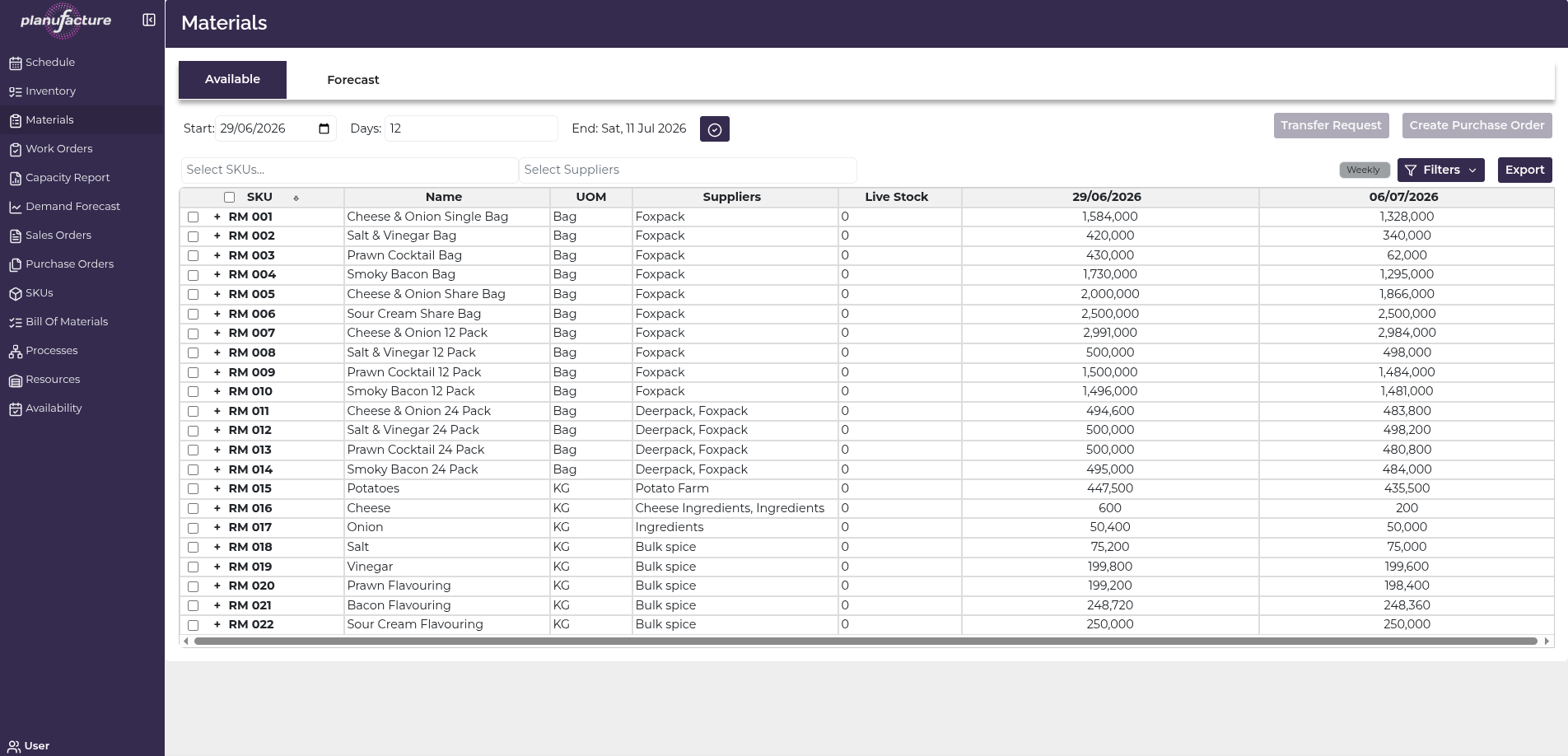
Overview
- Available: Current and projected stock levels
- Forecast: Future material requirements
- Supplier information: Who supplies each material
- Date-based projections: Stock levels over time
View Tabs
Available Tab
Shows current and projected material availability:
Table Columns:
- SKU: Material code
- Name: Material description
- UOM: Unit of measure (Each, Kg, etc.)
- Suppliers: Supplier name(s)
- Live Stock: Current on-hand quantity
- Date Columns: Projected stock levels by date (e.g., 15/06/2026, 22/06/2026, 29/06/2026...)
Row Expansion: Click the expand icon (+) on any row to see additional details:
- Opening: Opening stock for the period
- Required For Work Orders: Material needed for planned production
- Ordered: Quantity on purchase orders
- Closing: Projected closing stock
- Short: Shortage amount
- Minimum Stock Level: Reorder point
Forecast Tab
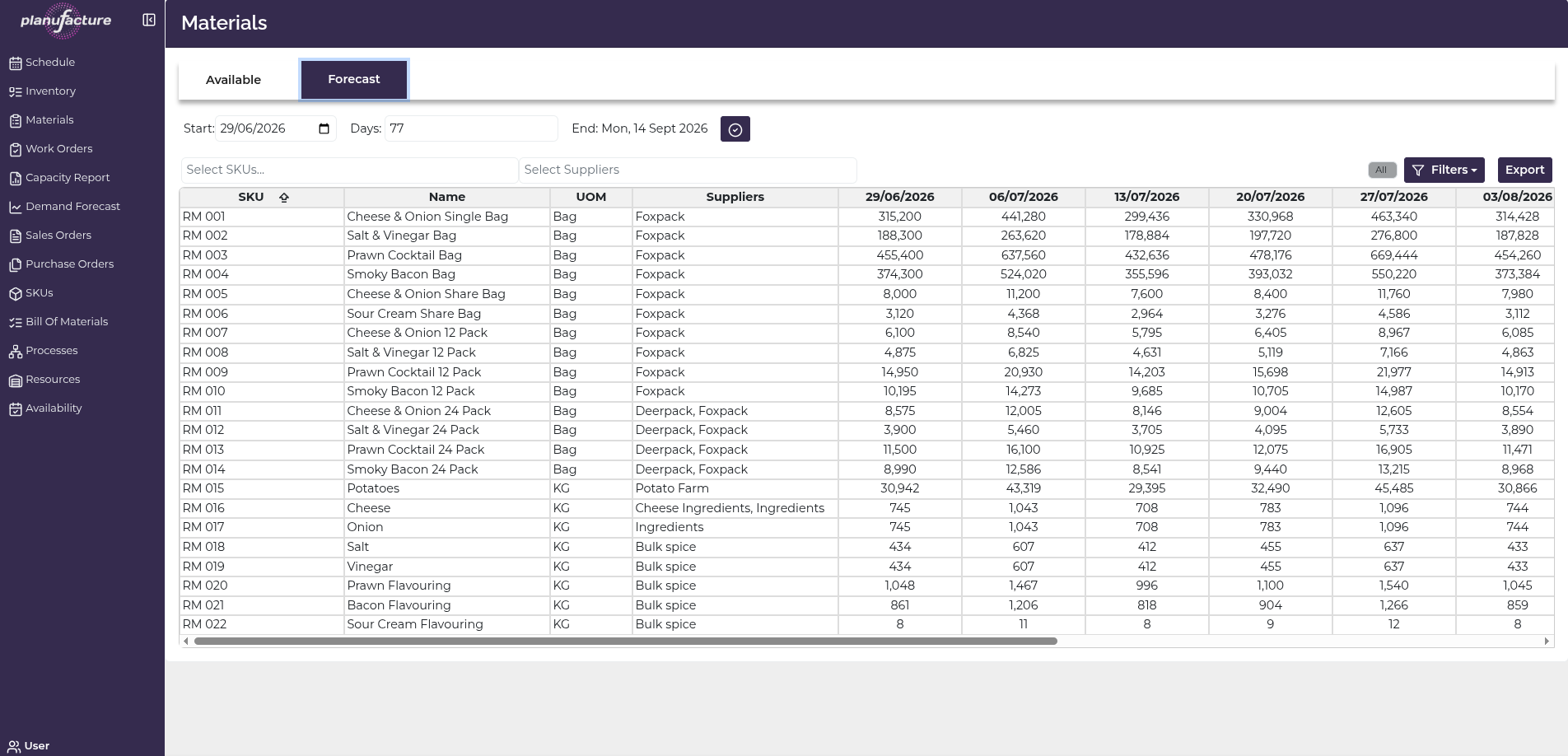
Shows projected material requirements over a longer horizon:
Table Columns:
- SKU: Material code
- Name: Material description
- UOM: Unit of measure
- Suppliers: Supplier name(s)
- Date Columns: Projected requirements by date (wider date range, e.g., 91 days)
Shows "0" for dates with no projected demand.
Date Range Controls
- Start: Beginning date for material view
- Days: Number of days to display (e.g., 28 days for Available, 91 days for Forecast)
- End: Calculated end date
- Date picker with calendar interface
Filtering Options
Select SKUs
Dropdown with search:
- Search box to find specific materials
- Shows SKU code and description
- Select multiple SKUs to filter view
- Checkbox selection
Select Suppliers
Dropdown with search:
- Filter materials by supplier
- Shows supplier names
- Select multiple suppliers
- Useful for supplier-specific planning
Additional Controls
- Weekly: Toggle for weekly aggregation (instead of daily)
- Filters: Advanced filtering options
- Export: Export data to file
Action Buttons
- Create Purchase Order: Generate PO for selected materials with shortages
Common Workflows
Checking Material Availability
- Navigate to Materials
- Select Available tab
- Use Select SKUs to filter specific materials
- Review Live Stock column for current inventory
- Check date columns for projected availability
Identifying Material Shortages
- In Available tab, click expand icon (+) on a material row
- Review expanded details:
- Required For Work Orders: Upcoming demand
- Ordered: Incoming supply
- Closing: Projected balance
- Short: Identifies shortages
- If Short shows a value, material will run out
- Click Create Purchase Order to replenish
Planning Purchases by Supplier
- Click Select Suppliers dropdown
- Choose specific supplier(s)
- View all materials from that supplier
- Review projected stock levels
- Create purchase orders for multiple items from same supplier
Reviewing Long-Term Requirements
- Select Forecast tab
- Adjust Days to show longer horizon (e.g., 91 days)
- Review projected requirements across all dates
- Identify patterns and plan bulk purchases
- Coordinate with suppliers for future deliveries
Creating Purchase Orders
- Identify materials with shortages or low stock
- Click Create Purchase Order button
- System guides through PO creation
- Select supplier, quantities, and delivery dates
Understanding Projections
The date columns show projected stock based on:
- Current inventory (Live Stock)
- Planned consumption (Required For Work Orders)
- Expected receipts (Ordered - purchase orders)
- Lead times and schedules
Expanded row details:
- Opening: Stock at start of period
- Required For Work Orders: Material consumed by production
- Ordered: Material arriving from suppliers
- Closing: Opening + Ordered - Required
- Short: If Closing < 0, shows shortage amount
- Minimum Stock Level: Safety stock threshold
Tips
- Expand rows to see detailed material requirements and identify shortages
- Use Select Suppliers to plan purchases by vendor
- Monitor Short values to proactively address material shortages
- Switch to Forecast tab for longer-term planning (91+ days)
- Export data for offline analysis or sharing with procurement team
- Check Minimum Stock Level to maintain safety stock buffers
- Use Weekly toggle for high-level capacity planning
- Use Show Shortage filter to quickly focus on materials that need attention