Bill of Materials
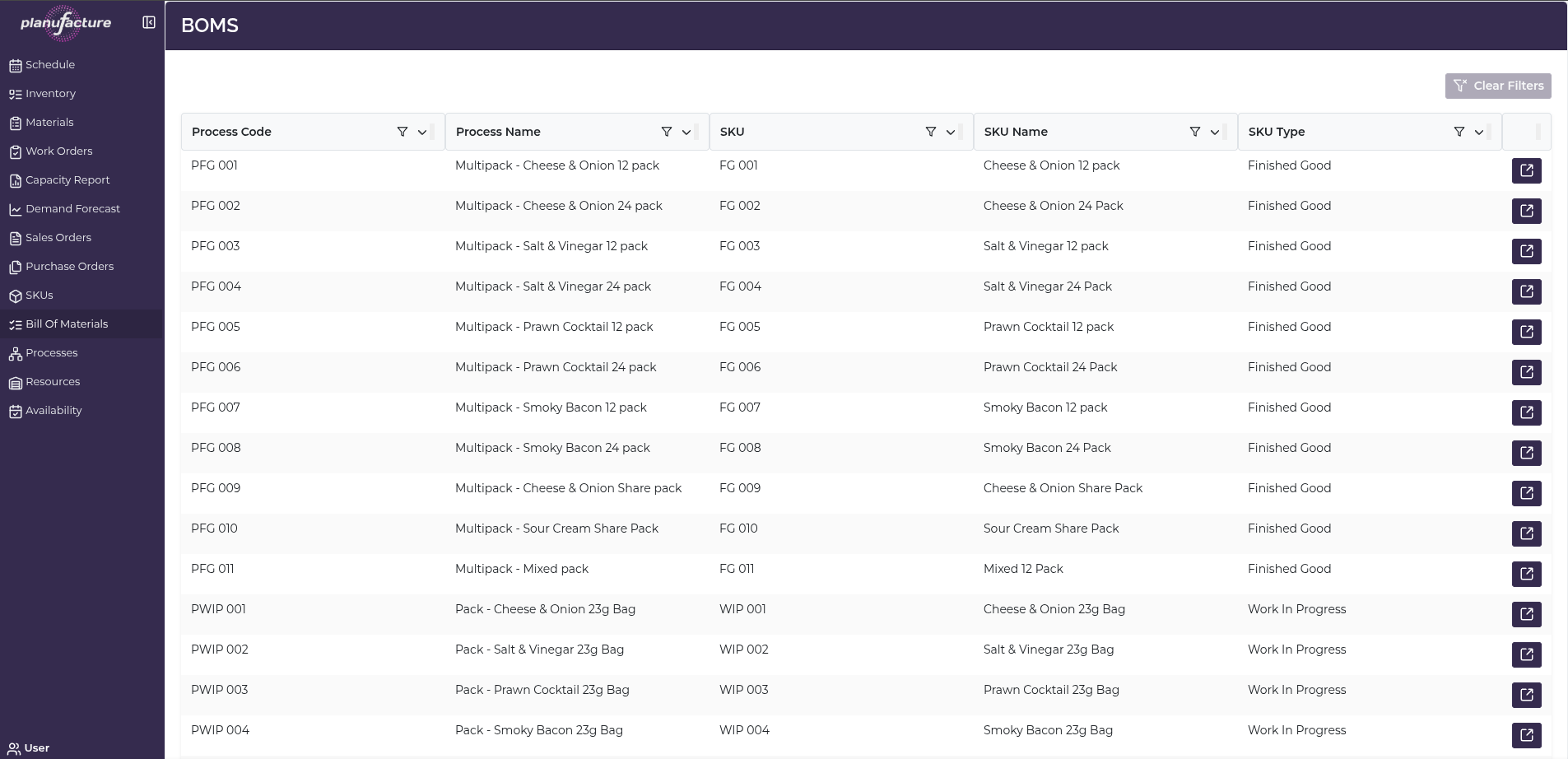
BOMs manages bill of materials definitions, showing which materials are required to produce each product through specific processes.
Overview
- List of all BOMs linked to processes and products
- Material requirements for each production process
- Quantities and relationships between inputs and outputs
- Primary and alternate material options
Top Bar Controls
Actions
- Clear Filters: Reset all applied filters
BOMs Table
Columns
- Process Code: Unique process identifier
- Process Name: Full process description
- SKU: Output product code
- SKU Name: Output product description
- SKU Type: Product type (e.g., Work In Progress, Finished Good)
Sortable Columns
All columns have sort icons allowing you to order by:
- Process Code
- Process Name
- SKU
- SKU Name
- SKU Type
Row Actions
Each BOM row has a detail icon (right side) to view full BOM details.
BOM Details View
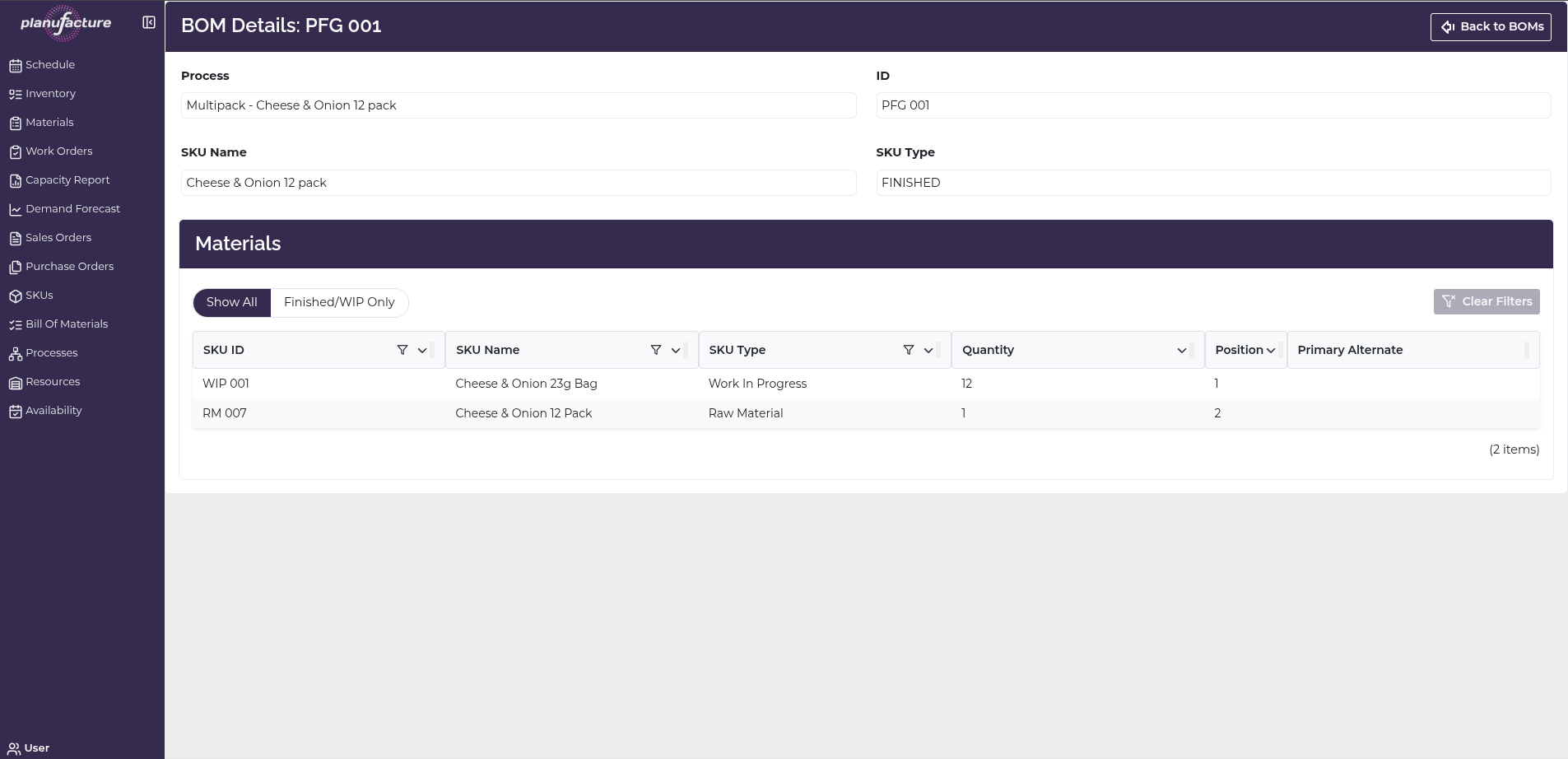
Click the detail icon to view complete bill of materials:
Page Header:
- Title: "BOM Details: [Process Code]"
- Back to BOMs button: Return to list
Process Information
- Process: Full process name and description
- ID: Process code
Output Product Information
- SKU Name: Product being produced
- SKU Type: Product type (e.g., WIP, Finished Good)
Materials Section
Filter Tabs:
- Show All: Display all materials
- Finished/WIP Only: Filter to finished goods and work in progress materials
Materials Table Columns:
- SKU ID: Material code
- SKU Name: Material description
- SKU Type: Material type (Raw Material, Work In Progress, etc.)
- Quantity: Amount required
- Position: Sort order or sequence
- Primary Alternate: Indicates if this is the primary material or an alternate
Features:
- Sortable columns
- Clear Filters button
- Set Primary button: Designate a material as primary alternate
- Item count at bottom (e.g., "4 items")
Example materials:
- IG-101-51: White Corn Bags (USA) - Raw Material - Quantity: 0.7926507937 - Primary
- IG-102-51: White Corn Bags (Spain) - Raw Material - Quantity: 0.7926507937 - Set Primary button
- IG-121-53: Lime - Raw Material - Quantity: 0.01642857143 - Position: 2
- IG-122: Water - Raw Material - Quantity: 1.261984126984 - Position: 3
Common Workflows
Viewing All BOMs
- Navigate to BOMs
- Review table of all bills of materials
- Sort by Process Name to group by production step
- Or sort by SKU to see BOMs by output product
Viewing BOM Details
- Click detail icon on BOM row
- BOM Details page opens
- Review:
- Process information
- Output product (SKU Name, Type)
- Materials section with all inputs
- See quantities required for each material
- Identify primary vs. alternate materials
Understanding Material Requirements
- In BOM Details, review Materials table
- Quantity column shows how much of each material is needed
- Quantities are typically ratios or per-unit amounts
- Position indicates order or sequence
- Use this for:
- Production planning
- Material procurement
- Cost estimation
Managing Primary and Alternate Materials
- In Materials table, review Primary Alternate column
- Primary indicates the default material
- Other materials are alternates (substitutes)
- Click Set Primary to change which material is primary
- Useful for:
- Supplier changes
- Material availability
- Cost optimization
Filtering Materials
- Use Show All to see all materials including alternates
- Use Finished/WIP Only to filter to specific types
- Helps focus on relevant materials
Understanding BOMs
BOM structure:
- Process: The production step or operation
- Output: The product being made (SKU)
- Inputs: The materials required (Materials table)
- Quantities: How much of each input is needed
Primary vs. Alternate:
- Primary: Default material used in production
- Alternate: Substitute materials that can be used instead
- Allows flexibility in material sourcing and availability
Quantity interpretation:
- Quantities are typically ratios or per-unit amounts
- Example: 0.7926507937 kg of corn per kg of output
- System scales quantities based on work order size
Tips
- Sort by Process Code to see BOMs in process order
- Sort by SKU to group BOMs by output product
- Review Quantity values to understand material consumption ratios
- Use Primary Alternate to manage material substitutions
- Set Primary when changing default materials
- Position helps organize materials in logical order
- Filter to Finished/WIP Only to focus on intermediate products
- Use BOM data for:
- Material requirements planning (MRP)
- Cost estimation and pricing
- Inventory planning
- Supplier management
Related
- Processes: BOMs linked to specific production processes
- SKUs: BOMs define relationships between input and output SKUs
- Materials: Material requirements drive material planning
- Work Orders: BOMs determine material allocations for production
- Inventory: Material consumption based on BOM quantities
- Purchase Orders: Material procurement based on BOM requirements
- Schedule: Production scheduling considers BOM material availability